When it comes to training transformers, it’s rarely a one-and-done process. Anyone who’s spent time fiddling with these models knows that results depend heavily on the little knobs and sliders behind the scenes—hyperparameters. And getting them right? That’s the tricky part. Random guesses and trial-and-error can get you somewhere, but for serious work, you need a systematic way to explore your options. That’s where Ray Tune steps in, and it does more than just speed things up—it makes the whole thing smarter.
This article isn’t a crash course in transformers or a checklist of what every hyperparameter does. Instead, we’re focusing on how to search for the right ones using Ray Tune, with transformers in the loop. If you’re already using Hugging Face or PyTorch Lightning, the pieces fit together almost naturally. Let’s walk through how.
At a glance, transformers can look plug-and-play. Load a pre-trained model, tweak the learning rate, fine-tune, and go. But when performance starts lagging or overfitting creeps in, it’s often because your model setup isn’t tuned to your task. That’s the job of hyperparameters—learning rate, batch size, weight decay, number of layers, dropout rate, warmup steps… and that’s just the beginning.
These values affect not just accuracy, but training time, memory usage, and how stable your training is. Even small changes in a transformer’s configuration can lead to dramatically different results. That’s why throwing random numbers at the problem won’t cut it in the long run.
Enter Ray Tune—a tool built to run experiments, evaluate, and figure out what works. It’s not just about automation. It’s about being methodical without having to babysit every run.
Ray Tune acts as the experiment manager. It schedules, runs, tracks, and compares different trials, each with a different combination of hyperparameters. It supports all the heavy lifters in the background (PyTorch, TensorFlow, Hugging Face) and allows you to scale up your search, whether you’re on a laptop or a multi-node cluster.
But what makes Ray Tune stand out isn’t just scale—it’s the search algorithms it offers. You’re not stuck with grid search or random sampling. It supports smarter strategies like:
These aren’t just buzzwords. They cut down training time and help you zero in on better-performing configurations with fewer runs.
Let’s get practical. Suppose you’re using a Hugging Face transformer model for text classification. Here’s how you can wire it up with Ray Tune, step by step.
Ray Tune expects a training function. This is where your training loop lives. It’s not the exact same script you’d run normally—you need to make it flexible enough to accept different hyperparameters on each trial.
python
CopyEdit
from transformers import Trainer, TrainingArguments
from datasets import load_dataset
from ray import tune
def train_transformer(config):
model_name = "distilbert-base-uncased"
dataset = load_dataset("imdb")
training_args = TrainingArguments(
output_dir="./results",
learning_rate=config["lr"],
per_device_train_batch_size=config["batch_size"],
num_train_epochs=config["epochs"],
weight_decay=config["weight_decay"],
logging_dir='./logs',
report_to="none"
)
trainer = Trainer(
model=model_init(),
args=training_args,
train_dataset=dataset["train"].shuffle().select(range(2000)),
eval_dataset=dataset["test"].shuffle().select(range(1000)),
tokenizer=tokenizer_init(),
compute_metrics=compute_metrics,
)
trainer.train()
eval_result = trainer.evaluate()
tune.report(accuracy=eval_result["eval_accuracy"])
You’ll notice that config is passed in. That’s Ray Tune’s way of injecting parameters into each run.
Ray Tune uses the concept of a search space to sample values. You can define these using its tune.choice or tune.uniform functions. Here’s an example:
python
CopyEdit
search_space = {
"lr": tune.loguniform(1e-5, 5e-4),
"batch_size": tune.choice([16, 32]),
"epochs": tune.choice([2, 3, 4]),
"weight_decay": tune.uniform(0.0, 0.3)
}
This allows Ray Tune to try combinations across all those ranges. You’re not fixing values; you’re letting it explore.
This is where you give Ray Tune some smarts. One solid starting combo is using ASHAScheduler with random sampling:
python
CopyEdit
from ray.tune.schedulers import ASHAScheduler
from ray.tune.search import BasicVariantGenerator
asha_scheduler = ASHAScheduler(metric="accuracy", mode="max")
tuner = tune.Tuner(
train_transformer,
param_space=search_space,
tune_config=tune.TuneConfig(
scheduler=asha_scheduler,
search_alg=BasicVariantGenerator(),
num_samples=10
),
run_config=air.RunConfig(name="transformer_tuning"),
)
results = tuner.fit()
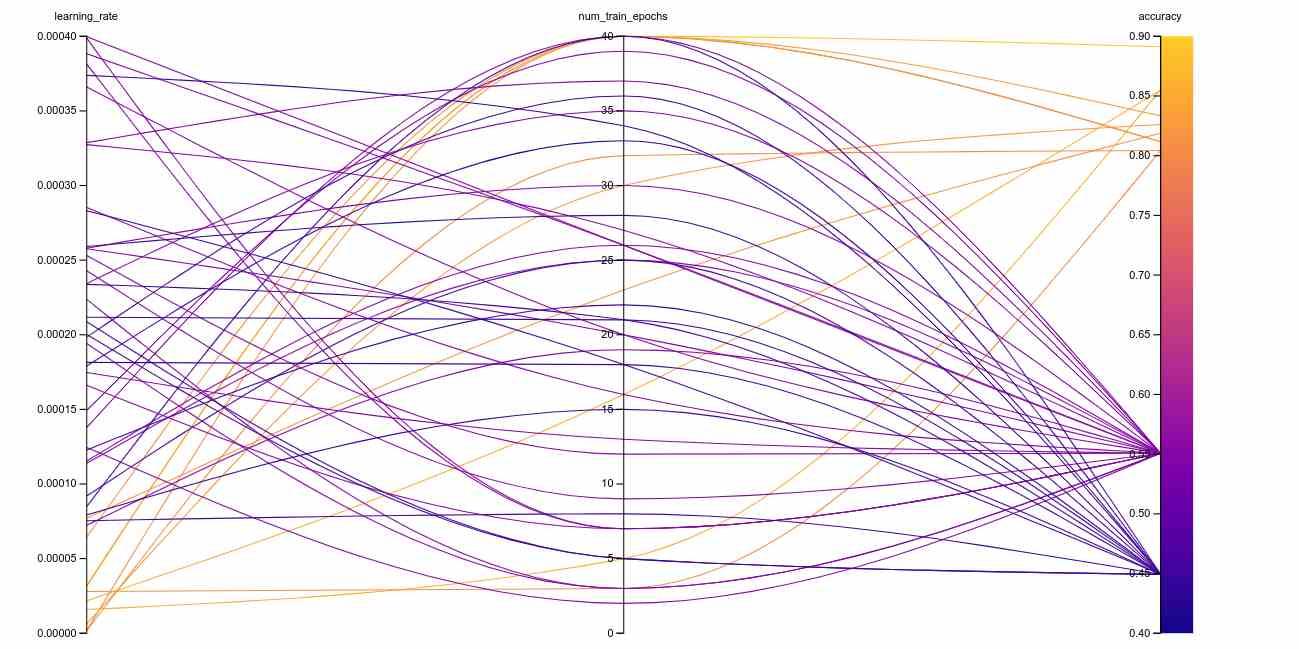
Here, Ray Tune will launch 10 trials, prune underperforming ones early, and keep the best ones running longer. The output is a sorted list of the best configurations tested.
Once it’s done, you can grab the configuration that gave you the best results:
python
CopyEdit
best_result = results.get_best_result(metric="accuracy", mode="max")
print("Best hyperparameters found were: ", best_result.config)
This isn’t just academic. You can plug this config into your final model training and know that you’ve already done the heavy lifting.
You'll get the most out of Ray Tune if you remember that each trial is a full training run. So, unless you have deep pockets (or a compute cluster), it's smart to limit your dataset during early experiments. Once you've narrowed down the field, expand to your full data for final training.
Also, watch your resource allocation. If you’re using GPUs, you can limit the number of concurrent trials to avoid overload. Ray makes this easy by letting you specify resource use per trial.
Finally, remember that smarter search strategies save time. Random search is easy but inefficient. Once you're comfortable, moving to Bayesian optimization or population-based training can lead to better results with fewer runs.
Hyperparameter tuning doesn’t have to be a guessing game. With Ray Tune, you get a structured way to explore options, reduce wasted runs, and improve your model’s performance with less hassle. When paired with transformers, it becomes a serious tool for squeezing out those extra percentage points that matter.
So next time you're setting up a transformer and wondering whether your learning rate is too high or your dropout too low, don't just cross your fingers. Let Ray Tune figure it out—and spend your time on things that actually need a human brain.

Failures often occur without visible warning. Confidence can mask instability.

We’ve learned that speed is not judgment. Explore the technical and philosophical reasons why human discernment remains the irreplaceable final layer in any critical decision-making pipeline.

Understand AI vs Human Intelligence with clear examples, strengths, and how human reasoning still plays a central role

Writing proficiency is accelerated by personalized, instant feedback. This article details how advanced computational systems act as a tireless writing mentor.

Mastercard fights back fraud with artificial intelligence, using real-time AI fraud detection to secure global transactions

AI code hallucinations can lead to hidden security risks in development workflows and software deployments

Small language models are gaining ground as researchers prioritize performance, speed, and efficient AI models
How generative AI is transforming the music industry, offering groundbreaking tools and opportunities for artists, producers, and fans alike.

Exploring the rise of advanced robotics and intelligent automation, showcasing how dexterous machines are transforming industries and shaping the future.

What a smart home is, how it works, and how home automation simplifies daily living with connected technology

Bridge the gap between engineers and analysts using shared language, strong data contracts, and simple weekly routines.

Optimize your organization's success by effectively implementing AI with proper planning, data accuracy, and clear objectives.